
Boost sales and increase average order value with a powerful WooCommerce upsell plugin featuring cart upsells, WooCommerce order bumps, post-purchase upsells, downsells, and cross-sells. Create targeted offers, free gifts, A/B tests, and smart promotions with all in one easy-to-use WooCommerce plugin.
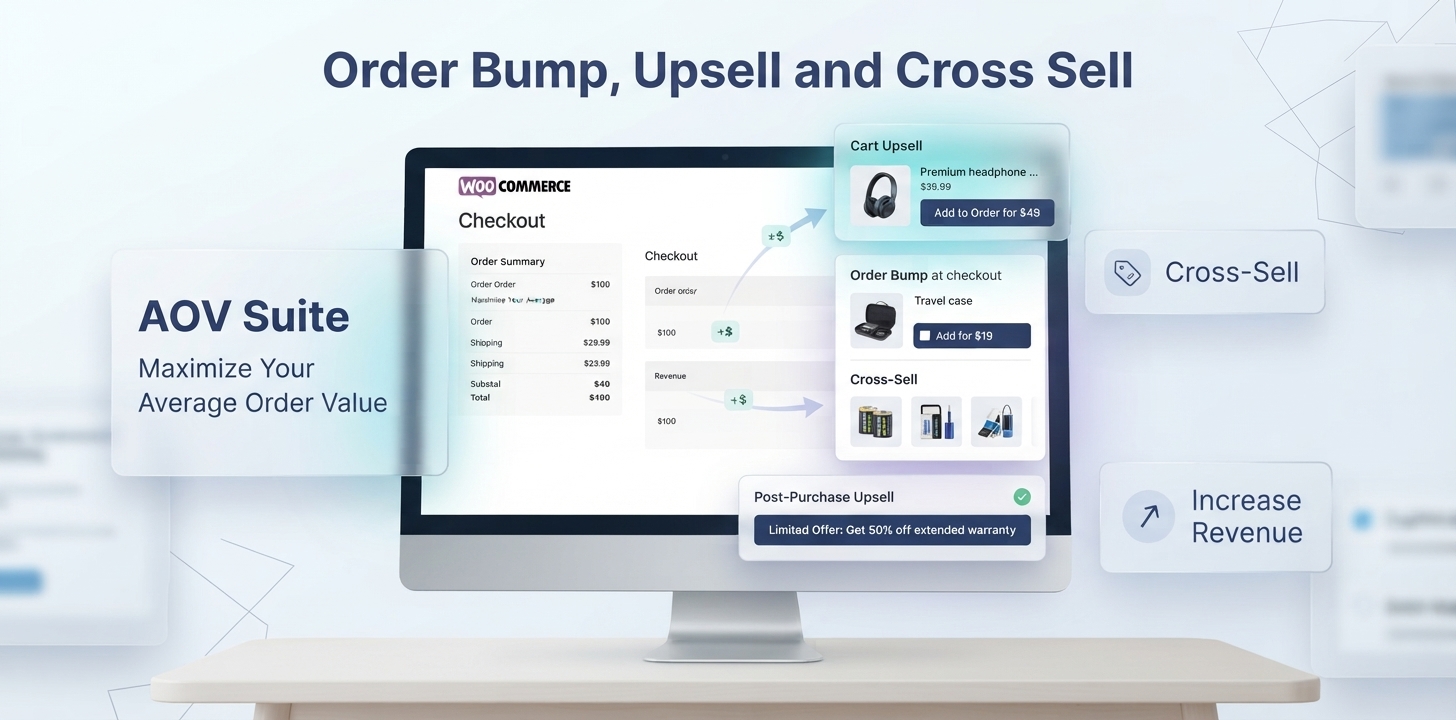
Order Bump, Upsell and Cross Sell is a complete AOV Suite built to help WooCommerce store owners increase average order value and generate more revenue from every order. As a powerful WooCommerce upsell plugin, it brings together cart upsells, WooCommerce order bumps, post-purchase upsells, cross-sells, free gifts, and targeted thank-you page offers in one complete solution.
Turn more existing customers into higher-value orders without forcing them through complicated sales funnels or adding unnecessary steps to the buying experience.
AOV Suite puts relevant offers directly into your WooCommerce Cart and Checkout blocks, immediately after purchase, and on the order confirmation page giving you multiple opportunities to recommend products customers are more likely to want and buy.
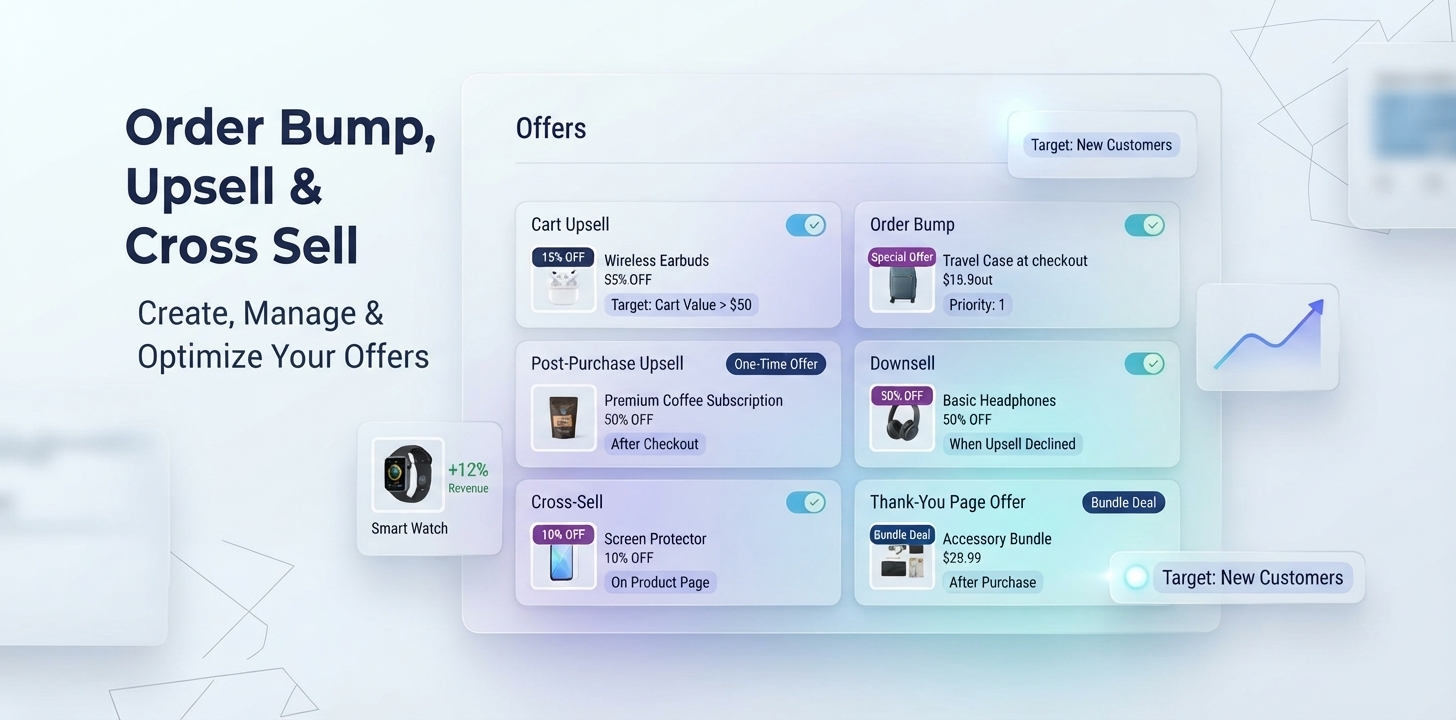
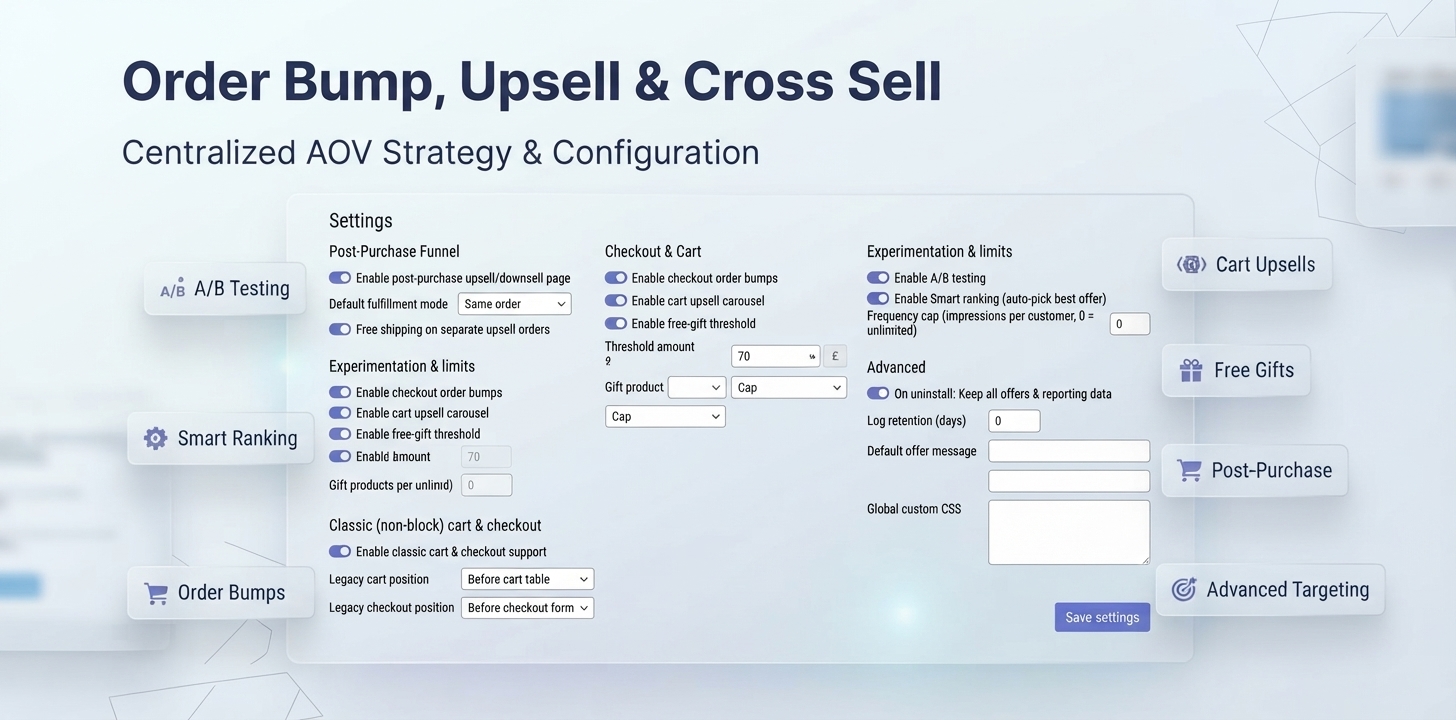
From simple product recommendations to targeted WooCommerce post-purchase upsell and downsell funnels, AOV Suite gives you the tools to create, target, test, measure, and optimize revenue opportunities from one place.
WooCommerce Cart Upsells
WooCommerce Order Bumps
Post-Purchase Upsell WooCommerce Offers
Post-Purchase Downsells
WooCommerce Cross-Sells
Thank-You Page Cross-Sells
Free Gifts With Purchase
Advanced Offer Targeting
A/B Testing
Smart Offer Ranking
Revenue & Conversion Reporting
Most WooCommerce stores put almost all their attention on getting customers to complete the first purchase.
But the purchase doesn’t have to be the end of the revenue opportunity.
Order Bump, Upsell and Cross Sell turns the entire buying journey into a connected AOV strategy.
With the AOV Suite, you can introduce relevant product recommendations before checkout, add convenient extras during checkout, present post-purchase offers immediately after payment, and continue product discovery on the thank-you page.
Instead of relying on a single upsell technique, you get a complete toolkit for increasing the value of orders you are already receiving.
Cart → Checkout → Purchase → Post-Purchase → Thank-You Page
Each stage gives you another opportunity to recommend complementary products, upgrades, accessories, add-ons, or exclusive offers.
The result is a more complete WooCommerce upsell and cross-sell strategy managed from one plugin.
Turn your Cart page into another opportunity to increase basket value with relevant product recommendations.
The AOV Suite adds a clean “You might also like” to the WooCommerce Cart page, helping customers discover products that naturally complement what they are already buying.
Recommend:
Accessories
Complementary products
Frequently purchased products
Product upgrades
Add-ons
Promotional products
You can optionally apply a discount to make an offer even more compelling.
Customers can add the recommended product directly to their cart without a full-page reload, keeping the shopping experience fast and friction-free.
When customers reach the Cart page, they have already demonstrated strong purchase intent.
A relevant recommendation gives them an easy opportunity to add another useful product without requiring you to acquire another customer.
With Order Bump, Upsell and Cross Sell, the Cart becomes an active part of your WooCommerce AOV optimization strategy rather than simply the final step before checkout.
Give customers one more relevant opportunity to increase their order before they pay.
The AOV Suite lets you create a WooCommerce order bump that appears directly inside the modern block-based Checkout experience.
For example:
Add the matching protection case for just $9.99.
Customers simply select the offer to add it to their order. If they change their mind, they can deselect it just as easily.
WooCommerce order bumps are ideal for:
Gift wrapping
Accessories
Product protection
Low-cost add-ons
Complementary products
Premium upgrades
Frequently purchased-together products
Because the offer appears directly inside checkout, customers don’t need to leave the checkout page or navigate through another product page.
The customer has completed the original purchase, but the opportunity does not have to end there.
Order Bump, Upsell and Cross Sell lets you create post-purchase upsell offers that appear after the original order is placed and before the customer reaches the standard WooCommerce order confirmation page.
This gives you an opportunity to present another relevant product while purchase intent is still high.
Use post-purchase offers for:
When the customer chooses an offer, the plugin prepares a separate WooCommerce order for the additional purchase and directs the customer to WooCommerce’s standard order-payment flow to confirm payment.
AOV Suite provides a streamlined post-purchase offer experience while keeping the original WooCommerce order financially unchanged.
When a customer accepts a post-purchase upsell or downsell, the plugin creates a separate WooCommerce order for the additional purchase.
The customer is then directed to WooCommerce’s standard order-payment page to review the additional order and confirm payment using an available payment gateway.
The plugin does not automatically charge the payment method used for the original order and does not perform automatic or off-session payment-method reuse.
Available payment methods depend on the payment gateways installed and enabled for WooCommerce’s order-payment flow. Payment authentication, saved-payment-method availability, redirects, and payment confirmation are handled by WooCommerce and the selected payment gateway.
Each post-purchase purchase keeps its own WooCommerce order, payment, invoice, tax records, refunds, and fulfillment status.
If the Same order view — separate payment and invoice presentation mode is enabled, the additional order can be linked visually with the original order for easier reference. This does not merge the additional purchase into the original order or change the original order’s items, total, transaction, or invoice.
Not every customer will accept your first offer.
That’s where a strategically placed downsell can give you another opportunity.
Create a post-purchase upsell followed by a lower-priced alternative when the customer chooses “No thanks.”
For example:
Premium Accessory — $49
Customer declines.
Essential Accessory — $29
Instead of ending the offer journey after the first rejection, you can present another relevant option.
This creates a flexible WooCommerce upsell and downsell funnel without sending the customer back through the original checkout form. Accepted offers continue through WooCommerce’s additional order-payment flow.
The AOV Suite also provides powerful WooCommerce cross-sell plugin functionality, allowing you to recommend complementary products throughout the customer journey.
Cross-selling works best when the recommended product naturally completes, enhances, or extends the customer’s original purchase.
Examples:
Laptop → Laptop sleeve
Camera → Memory card
Phone → Protective case
Coffee machine → Coffee beans
Shoes → Shoe care kit
Subscription → Premium add-on
Instead of showing generic recommendations to everyone, use targeting rules to determine which products should be presented to which customers.
The goal is simple: show more relevant products at the right moment.
Give customers a reason to increase their cart value.
With the AOV Suite’s free-gift threshold, you can automatically add a selected product to the cart for $0 when the customer’s subtotal reaches your chosen amount.
For example:
Spend $75 → Get a Free Gift
When the cart reaches the threshold, the selected gift is automatically added.
If the cart later falls below the threshold, the gift is automatically removed.
Use free gifts to:
Increase average order value
Encourage larger baskets
Create promotional campaigns
Reward higher-value purchases
Increase perceived customer value
Instead of simply asking customers to spend more, give them a tangible reason to reach the next spending level.
The AOV Suite is built around the modern WooCommerce shopping experience.
Cart upsells and checkout order bumps are designed specifically for WooCommerce Cart and Checkout blocks, giving you native upsell opportunities inside the modern block-based customer journey.
Supported experiences include:
WooCommerce Cart block upsells
WooCommerce Checkout block order bumps
Dynamic cart updates
Add-to-cart interactions without unnecessary page reloads
Checkout totals that update when an order bump is selected
Important: Cart upsells and checkout order bumps require your store’s Cart and Checkout pages to use WooCommerce Blocks.
Your order confirmation page can do much more than simply say “Thank you.”
The AOV Suite adds dedicated blocks that let you transform the WooCommerce thank-you page into a useful post-purchase engagement, cross-selling, feedback, and marketing experience.
Display related products after purchase and give customers an easy way to discover complementary products.
Show customer testimonials and reviews to reinforce social proof and build confidence in your products.
Answer common customer questions with an expandable FAQ section.
Ask customers to rate their experience from 1–5 and collect valuable feedback.
Display the products purchased in the current order and provide an account-creation prompt for guest customers.
Tracking integrations are optional. When enabled, purchase-event information may be transmitted to the configured third-party analytics or advertising service. Store owners are responsible for configuring any required consent mechanism and privacy/cookie disclosures applicable to their store.
Send purchase events to:
Meta
TikTok
Google Analytics 4
The tracking block is designed to fire the purchase event once per order, including when the customer refreshes the confirmation page.
Together, these blocks make the thank-you page another useful part of your WooCommerce AOV strategy.
The best upsell isn’t necessarily the biggest discount.
It’s the offer that’s most relevant to the customer.
That’s why the AOV Suite includes an advanced targeting rules engine that lets you control exactly who sees an offer, when they see it, and under what conditions.
Cart contains a specific product
Cart excludes a specific product
Product category
Product tag
Cart subtotal
Order total
Number of items
Payment method
Guest customer
Registered customer
Customer role
Account age
Previous purchases
AOV customer segment tags
Specific date ranges
Days of the week
Specific hours
Show or exclude offers based on the payment gateway used by the customer.
For example:
Cart contains Product A AND subtotal is $50+
OR
Customer is a returning customer
This gives you the flexibility to create highly relevant, personalized WooCommerce upsell offers without building complicated custom code.
The offer you think will perform best isn’t always the offer customers actually choose.
The AOV Suite includes built-in A/B testing so you can compare offer variants and make decisions based on real customer behavior.
Track:
Impressions
Acceptances
Skips
Conversion rate
Revenue
A/B variants
Test different products, discounts, and promotional strategies to discover which offers generate the strongest response.
Instead of guessing what works, let your store’s data guide your upsell strategy.
What happens when several offers qualify for the same customer?
With Smart Ranking enabled, AOV Suite can prioritize eligible offers using their historical performance instead of relying only on manually assigned priority.
The ranking calculation uses historical revenue per impression as its primary performance signal, together with conversion performance and the merchant-configured offer priority.
Performance data is smoothed so that offers with limited history are not ranked solely from a very small number of early events.
Smart Ranking is a statistical, performance-based ranking feature. It does not use artificial intelligence or automatically generate offer content.
This provides a data-driven way to order eligible WooCommerce offers based on actual recorded performance.
Creating offers is only half the strategy.
You also need to know which offers actually perform.
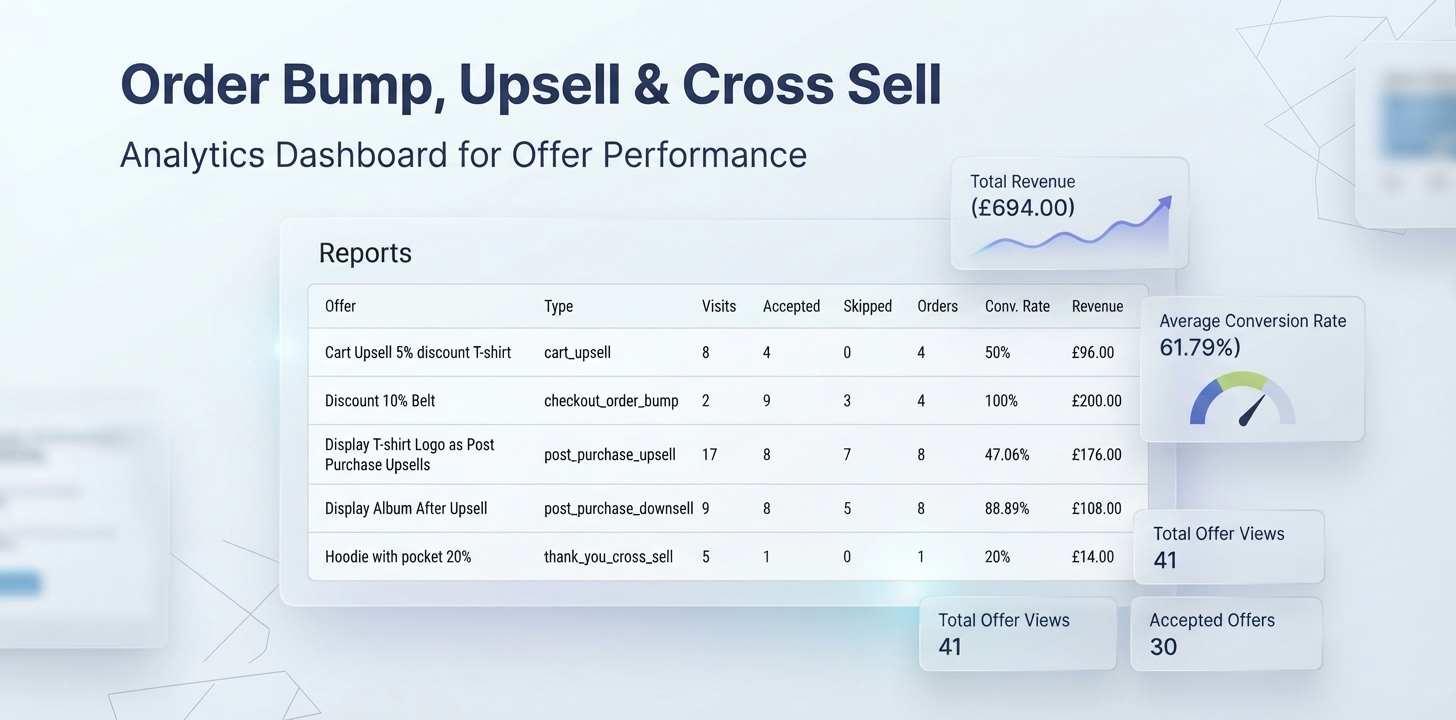
The AOV Suite records offer performance so you can understand which recommendations generate additional revenue and which ones need improvement.
Track:
Total upsell revenue
Offer views
Accepted offers
Skipped offers
Orders influenced
Conversion rate
Revenue generated
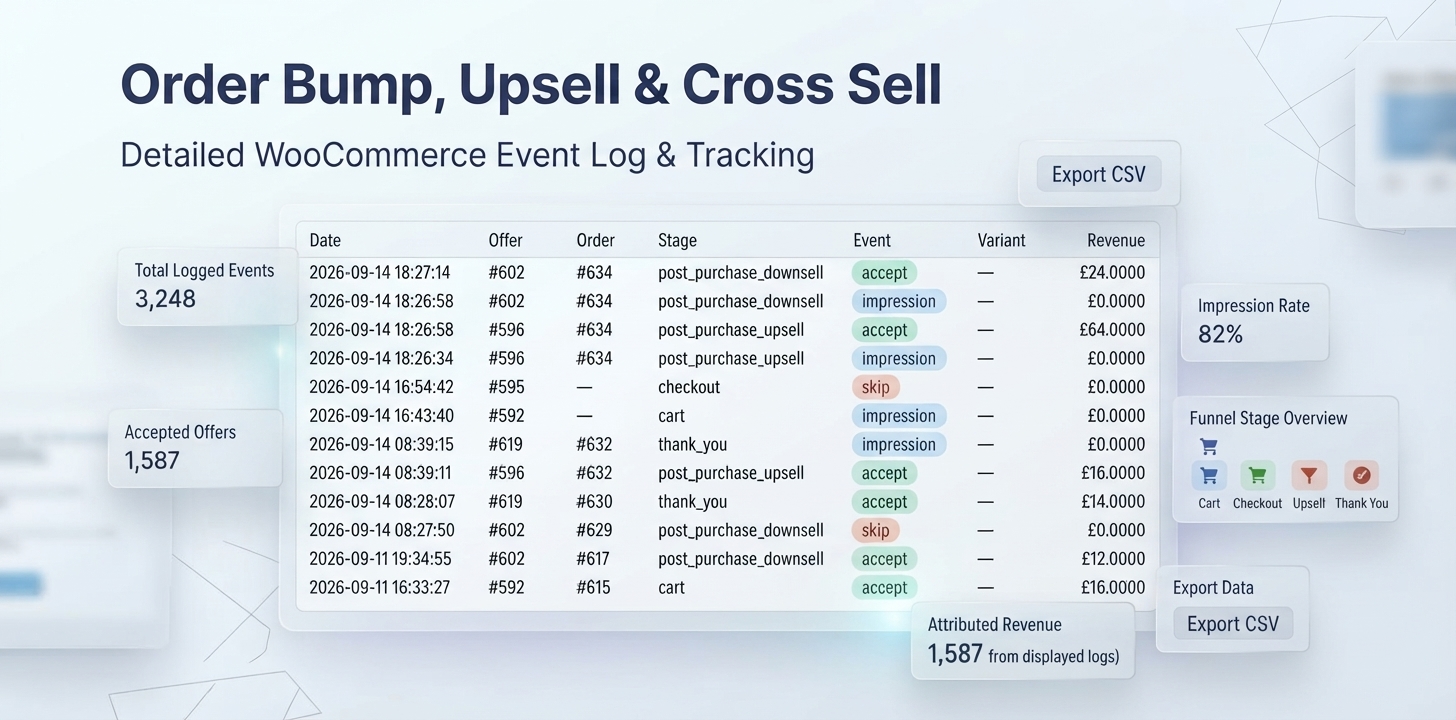
For deeper analysis, the Master Log records individual events, including:
Date
Offer
Order
Funnel stage
Event type
A/B variant
Attributed revenue
Export your complete event history as a CSV file whenever you need it.
Offer-performance data is also available inside the native WooCommerce Analytics area, keeping your upsell performance alongside the rest of your store reporting.
Acquiring a new customer can require significant time, marketing spend, and effort.
Increasing the value of an order from a customer who is already buying gives you another path to growth.
The AOV Suite gives you multiple opportunities to increase average order value in WooCommerce by presenting relevant products at high-intent moments throughout the customer journey.
Introduce complementary products before checkout.
Add a convenient extra directly inside checkout.
Present an exclusive offer immediately after payment.
Give customers another relevant option when they decline the first offer.
Motivate customers to reach a higher cart value.
Continue product discovery after the purchase.
One customer journey can contain multiple revenue opportunities without requiring multiple plugins.
Online checkout isn’t the only way customers place orders.
For manually created, phone, or email orders, the AOV Suite provides a staff-only Upsell Reminder field on products.
Add a reminder such as:
“Ask if they’d like the matching charger cable.”
The reminder appears to store staff on the relevant WooCommerce order and admin notification.
Customers never see the internal note.
This extends your upsell strategy beyond automated storefront experiences and helps your team identify additional opportunities during manual order processing.
Order Bump, Upsell and Cross Sell is designed to work within the WooCommerce ecosystem rather than forcing store owners into a separate sales platform.
Post-purchase upsells, downsells, and applicable thank-you cross-sell purchases use WooCommerce’s standard customer-confirmed order-payment flow.
When an additional purchase is accepted, the plugin creates a separate WooCommerce order and directs the customer to WooCommerce’s payment page when payment is required.
The plugin does not automatically charge or reuse the payment method from the original order.
The payment gateways available for the additional order depend on the gateways installed, enabled, and available for WooCommerce’s order-payment flow. Gateway-specific authentication, saved payment methods, redirects, and payment processing remain controlled by WooCommerce and the selected payment gateway.
The AOV Suite can recommend purchasable products used with extensions such as:
WooCommerce Subscriptions
WooCommerce Bookings
WooCommerce Memberships
These extensions are not required for the AOV Suite itself.
A read-only public API is available for developers building custom or headless WooCommerce storefronts.
Bring cart upsells, checkout order bumps, post-purchase offers, downsells, cross-sells, free gifts, targeting, testing, and reporting together in one WooCommerce solution.
Encourage customers to purchase relevant accessories, complementary products, upgrades, and additional items.
Present relevant offers at high-intent moments without unnecessarily interrupting the primary buying experience.
Use cart contents, customer information, previous purchases, dates, times, and payment methods to determine offer eligibility.
Use A/B testing, Smart Ranking, conversion rates, and revenue reporting to identify which offers actually perform.
Create offers, manage targeting rules, review performance, and configure your AOV strategy directly from WordPress.
Order Bump, Upsell and Cross Sell is designed as a complete WooCommerce upsell plugin and AOV Suite for store owners who want cart upsells, WooCommerce order bumps, post-purchase offers, downsells, cross-sells, free gifts, targeting, testing, and reporting in one solution.
A WooCommerce order bump is a small additional offer presented during checkout. Customers can accept it while completing their original purchase, typically by selecting a checkbox or similar offer control.
The AOV Suite lets you create targeted order bumps directly inside the modern WooCommerce Checkout block.
Yes. You can create post-purchase upsells and downsells that appear after an order is placed and before the normal WooCommerce order confirmation page.
Yes. You can create cross-sell recommendations for the Cart and thank-you page, with targeting rules that help display more relevant products.
The AOV Suite provides thank-you page cross-selling and other post-purchase content blocks.
For the primary post-purchase offer experience, use the dedicated post-purchase upsell feature, which appears before the standard WooCommerce order confirmation page.
Yes. Cart upsells and WooCommerce order bumps are designed specifically for the modern WooCommerce Cart and Checkout Blocks.
Yes. Targeting rules can use customer status, account information, previous purchases, customer tags, cart contents, order values, dates, times, and payment gateways.
Yes. Create multiple offers for the same funnel stage and use Priority, targeting rules, or Smart Ranking to control which eligible offer is shown first.
Yes. The AOV Suite includes offer-level A/B testing and records variant performance in the Master Log.
Yes. The AOV Suite records views, accepts, skips, orders influenced, conversion rates, and attributed revenue.
Yes. Order Bump, Upsell and Cross Sell declares compatibility with High-Performance Order Storage (HPOS).
No. The core AOV Suite features described on this page work with WooCommerce without requiring another paid extension.
Plugin: Order Bump, Upsell and Cross Sell — Version 1.0.0
WordPress: 6.5+
WooCommerce: 8.2+
PHP: 8.3+
WooCommerce Cart & Checkout Blocks: Fully supported for Cart Upsells and Checkout Order Bumps
HPOS: Compatible
Additional paid extension: Not required
Your customer has already made the most important decision: they decided to buy.
Now give them a relevant reason to add more.
Recommend the accessory that completes their purchase. Add a useful checkout extra. Present an exclusive post-purchase offer. Give customers a reason to increase their cart value. Continue product discovery on the thank-you page.
Order Bump, Upsell and Cross Sell gives WooCommerce store owners a complete AOV Suite to build, personalize, test, and measure these revenue opportunities from one powerful plugin.
Increase your WooCommerce average order value.
Create better-targeted upsells.
Sell more to the customers you already have.
Build your AOV strategy with Order Bump, Upsell and Cross Sell today.
Not Review Found.
Reviews
There are no reviews yet.